CORTEX
AI Assistant for Unreal Engine 5
Chat with Claude or GPT to create Blueprints, build widgets, generate VFX, animate characters, design sounds, and more — 18 builders, all inside the editor.
Everything You Need to Build Faster
Cortex covers the full Unreal Engine 5 workflow — from Blueprint logic to UI, world building to data structures.
Blueprint Creation & Editing
Create complete Blueprint actors from scratch or modify existing ones. 5-stage node resolution pipeline searches 11,000+ engine actions with fuzzy matching.
- Add components, variables, functions, and node graphs
- Auto pin-type coercion (Vector↔Transform, Int↔Float)
- Auto-retry on compile errors with AI self-correction
- Comment nodes placed for any unresolvable node
UMG Widget Builder
Create complete UMG Widget Blueprints with nested widget hierarchies, slot configuration, and full property support.
- 30+ widget types: CanvasPanel, VerticalBox, TextBlock, Button…
- Set text, color, font size, alignment, padding, visibility
- Configure slot properties (HAlign, VAlign, Size rules)
- Add, remove, and modify widgets after creation
PCG Biome Builder
AI-assisted Procedural Content Generation graph creation for landscape-based scatter. Requires the PCG Plugin.
- 8 biome presets: Forest, Desert, Tundra, Swamp, Alpine…
- Full pipeline: Sampler → Pruning → Filter → Transform → Spawner
- Per-layer density, scale, yaw, slope, and height filters
- Automatic landscape detection and volume positioning
Data Structures
Create User Defined Structs, Enums, and DataTables directly from chat with full field type support.
- Structs with bool, int, float, vector, softobject, and more
- Enums with any number of named entries
- DataTables with typed rows from any struct
- Read back definitions for context injection
Enhanced Input
Set up complete Enhanced Input systems including Input Actions and Input Mapping Contexts.
- Input Actions: bool, float, vector2d, vector3d value types
- Trigger types: pressed, released, hold, tap, pulse, chorded
- Modifiers: negate, swizzle, scalar, deadzone, smooth…
- Bind multiple keys per action including gamepad
Asset Management
Query and manage project assets, create materials with node graphs, and handle files — all from the chat panel.
- Search assets by type, name, or path
- Create materials with Constant, VectorParam, TextureSample nodes
- Delete, duplicate, rename, and import assets
- @ mention autocomplete for asset references
Level & World Commands
Manage actors in the currently open level — spawn, destroy, move, and configure from natural language.
- Spawn any Blueprint or native class in the level
- Set actor transform (location, rotation, scale)
- List and query actors by class or name
- Set actor properties and get level summaries
Analyst & Optimizer Modes
Deep analysis and optimization of existing Blueprints. Reads full graph structure automatically — no copy-pasting.
- Explain Blueprint logic in plain English
- Performance audit across all project Blueprints
- Refactor nodes into reusable functions
- Find unused variables and complexity issues
AI Behavior Trees
Create complete Behavior Trees with Blackboard assets for AI characters — patrol, chase, and decision-making logic from chat.
- Sequence, Selector, and SimpleParallel composites
- Decorator and Task nodes with custom parameters
- Blackboard keys with typed entries
- Full tree structure from a single prompt
Animation Montages
Build Animation Montages with sections, notifies, and blend configuration — ready to trigger from Blueprints.
- Named sections with branching points
- Anim Notifies and Notify States
- Blend-in/out curves and play rate
- Slot groups and composite sections
Animation Blueprints
Generate Animation Blueprints with State Machines — states, transitions, and crossfade configuration from natural language.
- State Machine graphs with named states
- Transition rules with crossfade duration
- Blend nodes and pose sampling
- Automatic skeleton binding
Sound Cues & Attenuation
Create Sound Cue node graphs and Sound Attenuation assets — full audio pipeline from a single prompt.
- WavePlayer, Mixer, Random, Looping, Delay nodes
- Sound Attenuation with distance/falloff curves
- Multi-source mixing and modulation
- Volume, pitch, and spatialization settings
IK Rigs & Retargeters
Set up IK Rigs with PBIK/FBIK solvers and IK Retargeters with automatic chain mapping between skeletons.
- PBIK and FBIK solver configuration
- Bone chain definitions (spine, limbs, fingers)
- IK Retargeter with auto chain mapping
- Cross-skeleton animation retargeting
Python Script Execution
Execute LLM-generated Python scripts directly inside the UE editor with built-in sandboxing for safety.
- Hybrid Python + JSON command workflows
- Sandboxed execution (blocked: os, subprocess, socket)
- Access to unreal module for editor automation
- Inline output and error reporting in chat
Niagara VFX
Create Niagara particle systems from chat — emitters, modules, renderers, and dynamic parameters for real-time VFX.
- Emitter and System asset creation
- Sprite, Mesh, and Ribbon renderers
- Spawn rate, lifetime, velocity, and color modules
- Dynamic parameters for runtime control
Level Sequencer
Build and edit Level Sequences for cinematics — camera cuts, animation tracks, audio, and keyframed properties.
- Camera cut tracks with auto-binding
- Actor animation and transform tracks
- Audio tracks synced to timeline
- Float, vector, and bool keyframe curves
MetaSounds
Create MetaSound patches with node-based audio graphs — oscillators, filters, envelopes, and trigger logic.
- Oscillator nodes (sine, saw, square, noise)
- Filter and envelope generators
- Trigger inputs and audio parameter interfaces
- Modular graph patching from natural language
Pose Search & Motion Matching
Configure Pose Search databases, schemas, and motion matching channels for fluid character animation.
- Pose Search database and schema creation
- Motion matching channel configuration
- Animation sequence indexing
- Trajectory and pose feature setup
From Chat to Blueprint in Seconds
Cortex bridges natural language and Unreal Engine's internal APIs through a structured command pipeline.
Describe What You Want
Type a natural language request in the Cortex chat panel inside UE5. Reference existing assets with @ mentions or drag them from the Content Browser.
AI Generates Commands
Cortex sends your message to Claude or GPT with full Unreal Engine context — node catalog, Blueprint structures, and conversation history.
Commands Execute in Editor
The LLMCommandExecutor parses the AI's response and dispatches each command to the appropriate builder — BlueprintBuilder, WidgetBuilder, BiomeBuilder, and more.
Results Shown Inline
Results appear in the chat stream as green Tool messages. If compilation fails, Cortex automatically retries — sending error details back to the AI for self-correction.
5-Stage Node Resolution Pipeline
The Right Tool for Every Task
Switch between specialized modes with a single click. Each mode configures the AI's behavior and provides targeted quick-action buttons.
General Purpose Creation
The default mode for creating and modifying any asset type. The AI responds to free-form requests and executes commands automatically. Best for creating new Blueprints, asking questions, and general asset work.
Capabilities
- Create Blueprint actors from scratch
- Add components, variables, and functions
- Wire node graphs with natural language
- Reference assets with @ mentions
- Attach screenshots for visual context
- Drag & drop assets from Content Browser
Example
Blueprint Refactoring
Focused on improving existing Blueprint graphs. Select a Blueprint from the dropdown, then use the action buttons to refactor, optimize, and clean up your graphs.
Capabilities
- Refactor nodes into reusable functions
- Optimize graph for performance
- Target-optimize selected nodes only
- Find unused variables
- Reads full BP structure automatically
- No manual copy-pasting required
Example
Deep Blueprint Analysis
Deep analysis and plain-English explanation of Blueprint logic. Falls back to the currently open Blueprint editor if no BP is selected in the dropdown.
Capabilities
- Full plain-English walkthrough of any BP
- Explain only selected nodes
- Performance audit across all project BPs
- Complexity rating and simplification tips
- Tick usage and node count analysis
- Identify bottlenecks before optimizing
Example
PCG Landscape Generation
AI-assisted PCG biome generation. Select a preset, configure parameters, and let Cortex design and spawn a complete PCG graph in your level. Requires the PCG Plugin.
Capabilities
- 8 biome presets (Forest, Desert, Tundra…)
- Scan project for meshes to include
- Configure radius, density, seed, cell size
- Full PCG pipeline auto-generated
- Per-layer scatter configuration
- Automatic landscape detection
Example
A Native Panel Inside UE5
Cortex runs as a native Slate panel docked directly in the Unreal Engine editor. No browser tabs, no copy-pasting — just describe what you want and watch it happen.
Real Results, Real Projects
Every screenshot below was produced inside Unreal Engine 5 using Cortex — no external tools, no leaving the editor.
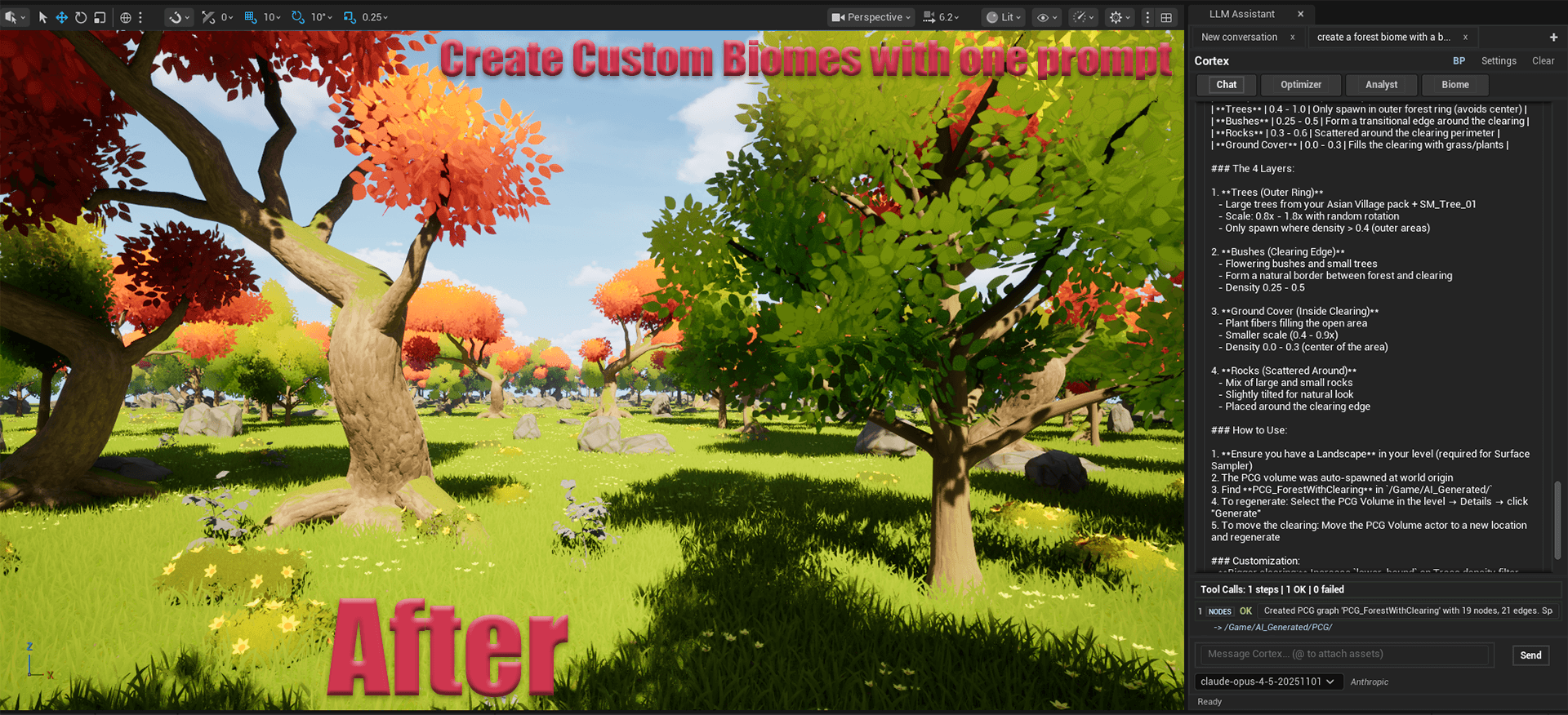
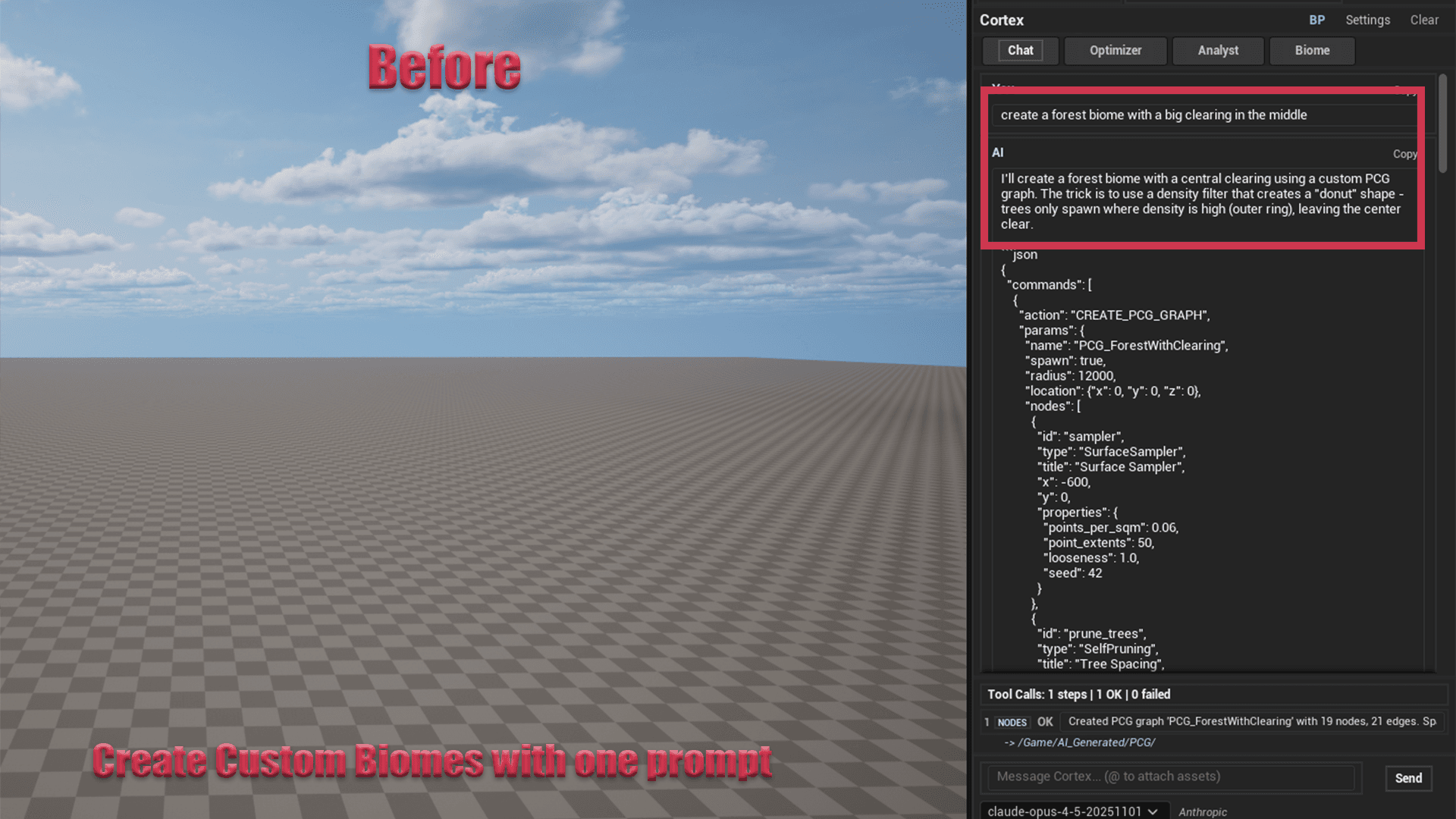
Create Custom Biomes with One Prompt
A dense forest with trees, bushes, ground cover, and rocks — generated from a single natural language description. Full PCG pipeline created automatically.
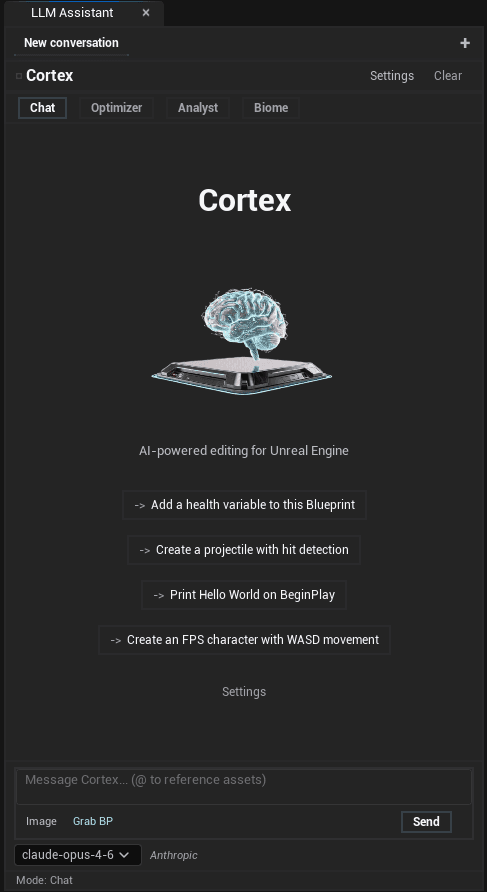
Cortex Chat Panel
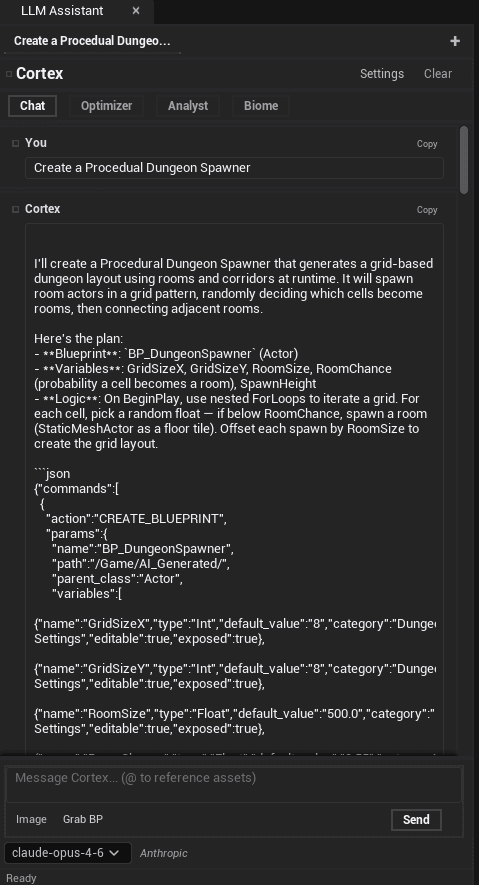
Blueprint Generation
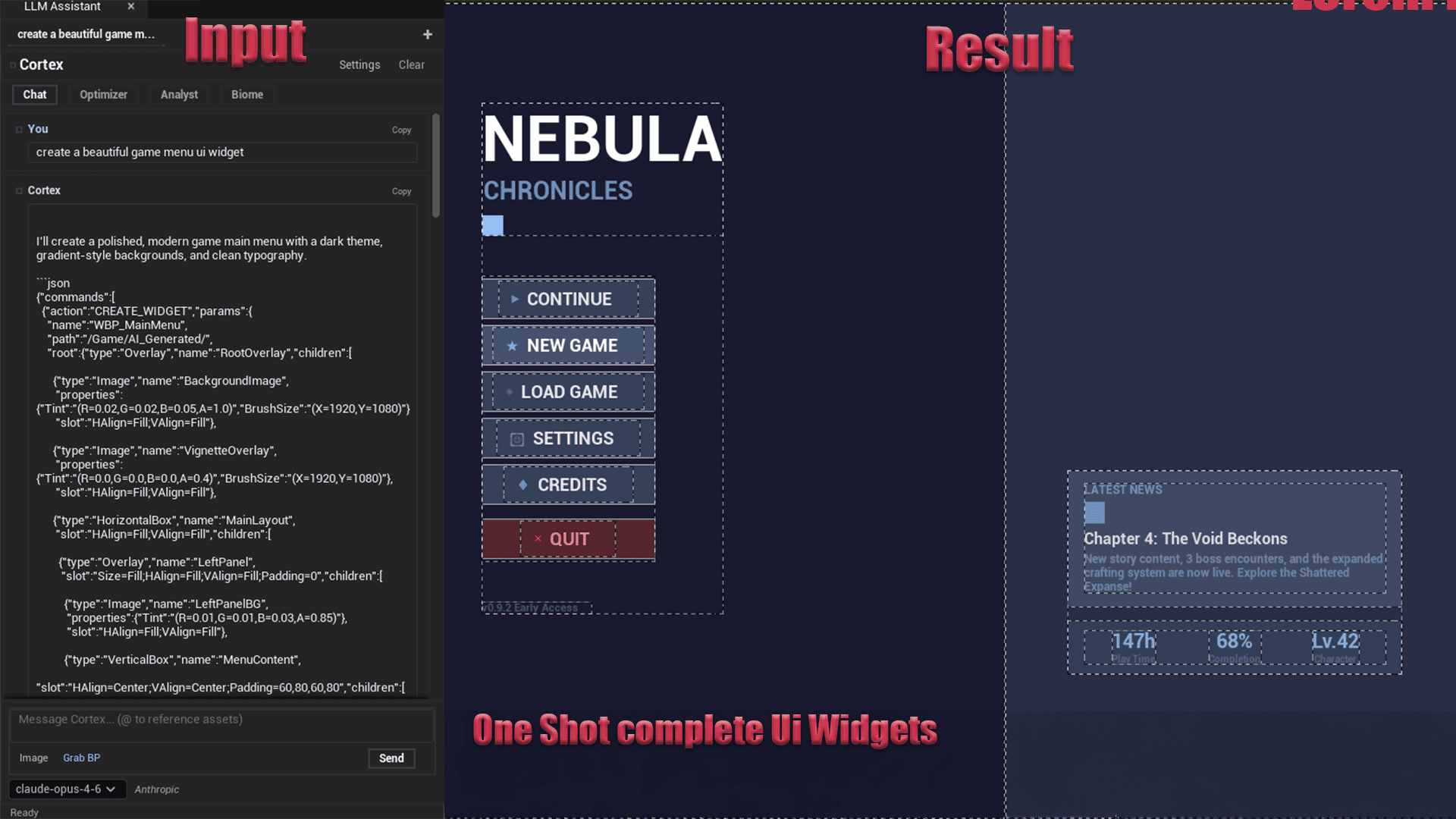
One-Shot UMG Widgets
PCG Before
Your AI, Your Choice
Cortex works with Anthropic Claude, OpenAI GPT, and any OpenAI-compatible endpoint. Bring your own API key.
Anthropic Claude
RecommendedClaude is the strongly recommended provider. claude-opus-4-6 and claude-sonnet-4-6 deliver the best results for complex multi-step Blueprint construction, PCG biomes, and UMG widget creation.
Models
Highlights
- claude-opus-4-6 & claude-sonnet-4-6 recommended for best results
- Best instruction following for complex Blueprint tasks
- Large context window for long multi-step conversations
- Vision support for screenshot and image analysis
Quick Setup
- 1Go to console.anthropic.com
- 2Create an API key
- 3Select Anthropic Claude in Cortex Settings
- 4Choose claude-opus-4-6 or claude-sonnet-4-6
OpenAI GPT
SupportedFull OpenAI GPT support including vision. GPT-4o works well for Blueprint creation and supports image attachments for visual context.
Models
Highlights
- GPT-4o vision for screenshot analysis
- Fast response times
- Wide model selection
- Familiar API for existing users
Quick Setup
- 1Go to platform.openai.com
- 2Create an API key
- 3Select OpenAI GPT in Cortex Settings
- 4Paste your key and select a model
Custom Endpoint
AdvancedConnect to any OpenAI-compatible API — self-hosted models, LM Studio, Ollama, or private deployments. Local models work but produce less reliable results.
Models
Highlights
- Full privacy — no data leaves your machine
- Works with LM Studio and Ollama
- Any OpenAI-compatible endpoint
- Custom model names supported
Quick Setup
- 1Select Custom Endpoint in Cortex Settings
- 2Enter your endpoint URL
- 3Enter API key (or any placeholder)
- 4Enter the model name your server expects
API keys are stored locally in your project's Saved/ directory and never transmitted anywhere except directly to your chosen AI provider. Cortex does not have a backend server.
Up and Running in 4 Steps
No build steps, no configuration files. Just drop the plugin in and go.
Purchase on Fab
Buy Cortex on the Fab marketplace. Once purchased, it installs directly through Epic Games Launcher — no manual file copying required.
fab.com → Search "Cortex" → Purchase → Install to Engine
Enable Cortex Plugin
Open your UE5 project, go to Edit → Plugins, search for "Cortex" or "LLM Assistant", enable it, and restart the editor when prompted.
Edit → Plugins → Search "Cortex" → ✓ Enable → Restart Now
Enable PCG Plugin (Optional)
For Biome mode, also enable the Procedural Content Generation plugin. If you don't need PCG biomes, skip this step.
Edit → Plugins → Search "Procedural Content Generation" → ✓ Enable → Restart
Open & Configure
Open Cortex via Window → LLM Assistant (or the toolbar button). Click ⚙ Settings, select your AI provider, paste your API key, and start chatting.
Window → LLM Assistant
⚙ Settings → Select Provider → Paste API Key → Done
Requirements
Unreal Engine
5.7 or later
Platform
Windows 64-bit
API Key
Anthropic or OpenAI
PCG Plugin
Optional (Biome mode)
Engine-wide install: Copy the plugin to C:\Program Files\Epic Games\UE_5.7\Engine\Plugins\Marketplace\ to make Cortex available in all your UE5.7 projects automatically.
One-Time Purchase. Yours Forever.
No subscriptions. Pay once, use forever. You only additionally pay for the AI API calls you make — directly to Anthropic or OpenAI.
Cortex
Personal
For an individual creator or a small team with not more than $100k of revenue or funding in the last 12 months.
Get Cortex — Personal- All 18 builders (Blueprints, Widgets, VFX, Audio…)
- Niagara VFX, Level Sequencer, MetaSounds
- AI Behavior Trees & Animation Blueprints
- Pose Search & Motion Matching
- PCG Biome Builder (8 presets)
- Sound Cues, IK Rigs, Python Scripting
- Chat, Optimizer, Analyst, Biome & Help modes
- Claude, GPT, Custom endpoint support
- Auto-retry on compile errors
- Image / screenshot attach (vision)
- Multiple conversation tabs
- Commercial use license
- Discord community support
- Free updates for the major version
Cortex
Professional
For studios or other entities with over $100k revenue or funding in the past 12 months.
Get Cortex — Professional- Everything in Personal
- All 18 builders (Blueprints, Widgets, VFX, Audio…)
- Niagara VFX, Level Sequencer, MetaSounds
- AI Behavior Trees & Animation Blueprints
- Pose Search & Motion Matching
- PCG Biome Builder (8 presets)
- Sound Cues, IK Rigs, Python Scripting
- Chat, Optimizer, Analyst, Biome & Help modes
- Claude, GPT, Custom endpoint support
- Auto-retry on compile errors
- Image / screenshot attach (vision)
- Commercial use license
- Discord community support
- Free updates for the major version
AI API Costs (separate from plugin)
Billed directly by Anthropic or OpenAI. Cortex never touches your payment.
Input
$15 / 1M tokens
Output
$75 / 1M tokens
Typical / request
~$0.05–0.15 per request
Input
$3 / 1M tokens
Output
$15 / 1M tokens
Typical / request
~$0.01–0.05 per request
Input
$2.50 / 1M tokens
Output
$10 / 1M tokens
Typical / request
~$0.01–0.04 per request
Input
Free
Output
Free
Typical / request
Hardware cost only
Frequently Asked Questions
Everything you need to know about Cortex.
We're Here to Help
Have a question, found a bug, or need help getting started? Reach out through Discord or email — we respond fast.
Discord Community
Join the Cortex Discord server for real-time help, feature requests, and community discussions. This is the fastest way to get support.
Email Support
For billing questions, license issues, or detailed technical support. Professional license holders receive priority email responses.
Quick Help
Before reaching out, check if your question is already answered:
- How do I get my API key?
- Why is Biome mode greyed out?
- Blueprint compiles with errors
- Rate limit errors (429)
- Full documentation
Response Times
Build Faster.
Ship Smarter.
Stop context-switching between docs, Stack Overflow, and your editor. Cortex brings 18 AI-powered builders directly into UE5 — no subscription, no setup, just results.